Was ist das?
Beim Schießen auf ein bewegtes Ziel zeigt das Spiel einen vorausberechneten Zielpunkt – den Pip. Er wird aus deiner aktuellen Bewegung und der Geschossgeschwindigkeit gerechnet. Pip-Manipulation heißt: die Bewegung so ändern, dass diese Rechnung nicht mehr stimmt.
Wann verwende ich es?
Defensiv, immer wenn jemand hinter dir ist und schießt. Auch offensiv nützlich: wer weiß, wie der Pip entsteht, versteht auch, warum der eigene Schuss danebengeht.
Was will ich damit erreichen?
Du willst, dass jeder Schuss dorthin geht, wo du gleich nicht mehr bist. Nicht ausweichen – die Vorhersage ungültig machen.
Ausgangslage
Jemand sitzt hinter dir und hat eine Schusslösung. Deine Schilde halten noch.
Ablauf Schritt für Schritt
- Bewegung ändern, nicht Richtung. Seitliches Gleiten ändert die Bahn sofort, ohne dass die Nase schwenkt.
- Unregelmäßig. Nicht im Takt. Mal eine Sekunde, mal drei; mal nach oben, mal seitlich.
- Auch aufhören. Ein plötzlicher Stopp der Querbewegung verschiebt den Pip genauso wie ihr Beginn.
- Schub dazu. Bremsen und Beschleunigen ändern die Rechnung ebenfalls.
- Nicht die Nase verreißen. Wer nur die Nase schwenkt, ändert die Flugbahn kaum – und trifft selbst nicht mehr.
Tastatur und Maus
Auf Tastatur ist das ein Spiel mit vier Tasten. Wichtig: kurze, unregelmäßige Anschläge statt Dauerdruck – Dauerdruck ergibt eine neue gleichmäßige Bahn, die wieder berechenbar ist.
Gebraucht wird alles, was deine Bewegung ändert, ohne die Nase zu verreißen: die vier Gleitrichtungen, Schub und Bremse.
| Spielaktion | Standard Tastatur/Maus | Standard Joystick | Auslösung |
|---|---|---|---|
| Nach oben gleiten (abs.) | Leertaste | Knopf 9 | einmal tippen |
| Nach unten gleiten (abs.) | Strg links | Knopf 10 | einmal tippen |
| Nach links gleiten (abs.) | A | Hut 1 links | einmal tippen |
| Nach rechts gleiten (abs.) | D | Hut 1 rechts | einmal tippen |
| Throttle - Increase | W | im Standard nicht belegt | einmal tippen |
| Throttle - Decrease | S | im Standard nicht belegt | einmal tippen |
| Boost | Shift links | Knopf 8 | halten |
| Raumbremse | X | im Standard nicht belegt | einmal tippen |
| Erfassung durchlaufen – Angreifer – vorwärts | 4 | im Standard nicht belegt | einmal tippen |
Standardbelegung des Spiels, Spielstand 4.10.0 (11644). Hast du selbst umbelegt, gilt deine Belegung.
HOTAS/HOSAS: die Joystickspalte ist die Standardbelegung EINES Sticks. Auf zwei Stöcken ordnest du Nicken, Gieren, Rollen und das seitliche Gleiten selbst zu – welche Achse ein Manöver braucht, steht im Abschnitt HOTAS / HOSAS.
HOTAS / HOSAS
Ein Manöver braucht keine bestimmten Tasten, sondern bestimmte Achsen und Funktionen. Wer HOTAS oder HOSAS fliegt, ordnet sie einmal zu und liest dann nur noch, welche davon ein Manöver verlangt:
- Nicken, Gieren, Rollen – die drei Drehachsen. Im Standard liegen sie auf einem Stick auf X, Y und der Drehachse Rz.
- Gleiten X/Y/Z – seitlich, hoch/runter, vor/zurück. Im Standard sind das einzelne Knöpfe und ein Hut, keine Achsen; auf HOSAS legt man sie sinnvoll auf die Achsen des zweiten Sticks.
- Schub – der Schubregler oder die Vorwärts-/Rückwärtsfunktion.
- Boost, Raumbremse, entkoppelter Modus – drei Knöpfe, die du im Kampf blind treffen musst.
- Zielerfassung – mindestens „Ziel unter dem Fadenkreuz erfassen“ auf einem Daumenknopf.
Welche davon im Standard schon belegt sind, steht in der Tabelle oben. Alles, was dort „im Standard nicht belegt“ heißt, legst du selbst.
Hier zeigt sich der Vorteil von Gleitachsen am deutlichsten: Auf einer Achse kannst du die Querbewegung stufenlos und unregelmäßig verändern; mit Tasten gibt es nur an und aus.
Geschwindigkeit und Energie
Gleiten kostet Schub, aber kaum Vorwärtsgeschwindigkeit. Dauerhaftes Bremsen und Beschleunigen kostet mehr. Wenn dein Schiff langsam wird, wird die Vorhersage wieder leichter – Tempo halten gehört zur Pip-Manipulation dazu.
Bewegungsdiagramm
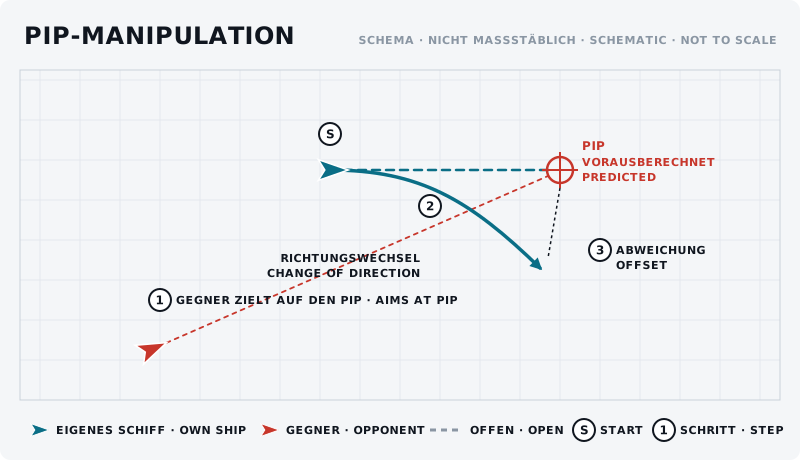
Die Skizze zeigt das Manöver von oben: eigenes Schiff blau, Gegner rot, Start mit „S“, Schritte nummeriert.
Was sollte der Gegner sehen?
Er sieht einen Zielpunkt, der springt. Je unregelmäßiger deine Bewegung, desto mehr schießt er auf Verdacht. Genau dann lohnt sich für ihn der Wechsel auf feste Waffen oder kurze Salven.
Typische Fehler
- Im Takt gleiten. Links-rechts-links im Sekundentakt ist genauso berechenbar wie gerader Flug.
- Nur die Nase schwenken. Ändert die Bahn nicht und kostet dich die eigene Schusslösung.
- Dauergleiten in eine Richtung. Das ist nur eine andere Gerade.
- Zu langsam werden. Ein langsames Ziel ist auch ohne Pip leicht zu treffen.
Gegenmaßnahme des Gegners
Er geht näher heran – je kürzer die Strecke, desto kleiner der Fehler der Vorhersage. Oder er wechselt auf feste Waffen und zielt von Hand dorthin, wo er dich erwartet, statt dem Pip zu folgen.
Übung
- Ziel
- Den Zielpunkt eines Partners ins Leere laufen lassen, ohne die eigene Richtung ganz aufzugeben.
- Vorbereitung
- Ein Partner folgt in fester Entfernung, zielt, schießt aber nicht – er meldet nur, wann sein Zielpunkt sauber auf dir lag.
- Aufgabe
- Fliegt 60 Sekunden und ändert alle ein bis drei Sekunden unregelmäßig eure Querbewegung: gleiten, aufhören, Richtung wechseln, Schub ändern. Der Partner zählt seine sauberen Momente. Danach dasselbe mit gleichmäßigem Rhythmus – und vergleicht.
- Erfolgskriterium
- Der Partner hat bei unregelmäßiger Bewegung deutlich weniger saubere Momente als bei gleichmäßiger.
- Partner
- erforderlich
- Benötigte Funktionen
- Nach oben gleiten (abs.)
- Nach unten gleiten (abs.)
- Nach links gleiten (abs.)
- Nach rechts gleiten (abs.)
- Throttle - Increase
- Throttle - Decrease
Anfänger-Variante
Lasst euch von einem Partner verfolgen, der nicht schießt, und probiert nur aus, wie stark sich sein Zielpunkt bei welcher Bewegung verschiebt.
Fortgeschrittene Variante
Pip-Manipulation im Kurvenkampf: unregelmäßig gleiten, während ihr gleichzeitig einen Rate Fight fliegt, ohne Winkel zu verlieren.
Nächster Schritt
Dieselbe Idee in Reinform ist die Defensive Spirale. Wenn du selbst treffen willst, hilft Gleiten im Kampf.