Was ist das?
Ein Overshoot ist, wenn der Verfolger schneller ist als der Verfolgte und deshalb an ihm vorbeifliegt. Danach sind die Rollen getauscht: Der Überschießende ist vorn, der Verfolgte hinten.
Wann verwende ich es?
Defensiv: wenn jemand hinter dir sitzt und schneller ist. Offensiv: wann immer du hinter jemandem hängst und schneller bist – dann musst du ihn vermeiden.
Was will ich damit erreichen?
Als Verfolgter willst du seine Geschwindigkeit gegen ihn verwenden. Als Verfolger willst du nicht in die einfachste Falle des Kurvenkampfs laufen.
Ausgangslage
Verfolgung auf kurzer Distanz. Der Verfolger hat mehr Tempo als der Verfolgte.
Ablauf Schritt für Schritt
Erzwingen (du wirst verfolgt):
- Warten, bis er nah genug ist – zu früh, und er korrigiert in Ruhe.
- Tempo wegnehmen: Schub heraus oder Raumbremse.
- Nase halten oder entkoppeln, damit du ihn beim Vorbeiziehen im Fadenkreuz hast.
- Wenn er vorbei ist: hinter ihn drehen und Schub wieder hoch.
Vermeiden (du verfolgst):
- Abstand beobachten. Wird er schnell kleiner, ohne dass du beschleunigt hast, bremst er.
- Rechtzeitig Tempo wegnehmen – lieber zu früh als zu spät.
- In die Lag-Kurve gehen (siehe Verfolgungskurven); sie führt außen an ihm vorbei statt über ihn hinweg.
- Wenn es doch passiert: nicht geradeaus weiterfliegen, sondern sofort quer abdrehen.
Tastatur und Maus
Die Raumbremse ist hier die wichtigste Taste auf beiden Seiten. Wer sie nur als Notbremse kennt, verschenkt das halbe Manöver.
Auf beiden Seiten dieselben Werkzeuge: Raumbremse und Schub, um Tempo zu ändern, Gleiten und der entkoppelte Modus, um die Nase dabei zu halten.
| Spielaktion | Standard Tastatur/Maus | Standard Joystick | Auslösung |
|---|---|---|---|
| Throttle - Increase | W | im Standard nicht belegt | einmal tippen |
| Throttle - Decrease | S | im Standard nicht belegt | einmal tippen |
| Boost | Shift links | Knopf 8 | halten |
| Raumbremse | X | im Standard nicht belegt | einmal tippen |
| Nach oben gleiten (abs.) | Leertaste | Knopf 9 | einmal tippen |
| Nach unten gleiten (abs.) | Strg links | Knopf 10 | einmal tippen |
| Nach links gleiten (abs.) | A | Hut 1 links | einmal tippen |
| Nach rechts gleiten (abs.) | D | Hut 1 rechts | einmal tippen |
| Entkoppelten Modus aktiveren/deaktivieren | C | im Standard nicht belegt | umschalten |
| Erfassung durchlaufen – Angreifer – vorwärts | 4 | im Standard nicht belegt | einmal tippen |
Standardbelegung des Spiels, Spielstand 4.10.0 (11644). Hast du selbst umbelegt, gilt deine Belegung.
HOTAS/HOSAS: die Joystickspalte ist die Standardbelegung EINES Sticks. Auf zwei Stöcken ordnest du Nicken, Gieren, Rollen und das seitliche Gleiten selbst zu – welche Achse ein Manöver braucht, steht im Abschnitt HOTAS / HOSAS.
HOTAS / HOSAS
Ein Manöver braucht keine bestimmten Tasten, sondern bestimmte Achsen und Funktionen. Wer HOTAS oder HOSAS fliegt, ordnet sie einmal zu und liest dann nur noch, welche davon ein Manöver verlangt:
- Nicken, Gieren, Rollen – die drei Drehachsen. Im Standard liegen sie auf einem Stick auf X, Y und der Drehachse Rz.
- Gleiten X/Y/Z – seitlich, hoch/runter, vor/zurück. Im Standard sind das einzelne Knöpfe und ein Hut, keine Achsen; auf HOSAS legt man sie sinnvoll auf die Achsen des zweiten Sticks.
- Schub – der Schubregler oder die Vorwärts-/Rückwärtsfunktion.
- Boost, Raumbremse, entkoppelter Modus – drei Knöpfe, die du im Kampf blind treffen musst.
- Zielerfassung – mindestens „Ziel unter dem Fadenkreuz erfassen“ auf einem Daumenknopf.
Welche davon im Standard schon belegt sind, steht in der Tabelle oben. Alles, was dort „im Standard nicht belegt“ heißt, legst du selbst.
Gebraucht werden Schub, Raumbremse und der entkoppelte Modus – alle drei blind erreichbar. Mit Gleitachsen kannst du beim Bremsen zusätzlich seitlich ausweichen, damit er dich beim Vorbeiziehen nicht mitnimmt.
Geschwindigkeit und Energie
Der Overshoot ist ein Energietausch: Du gibst deine Geschwindigkeit auf, um seine gegen ihn zu verwenden. Danach bist du langsam – in einem Kampf mit mehreren Gegnern ist das gefährlich. Erzwinge ihn nur, wenn du den Gegner danach auch wirklich angreifen kannst.
Bewegungsdiagramm
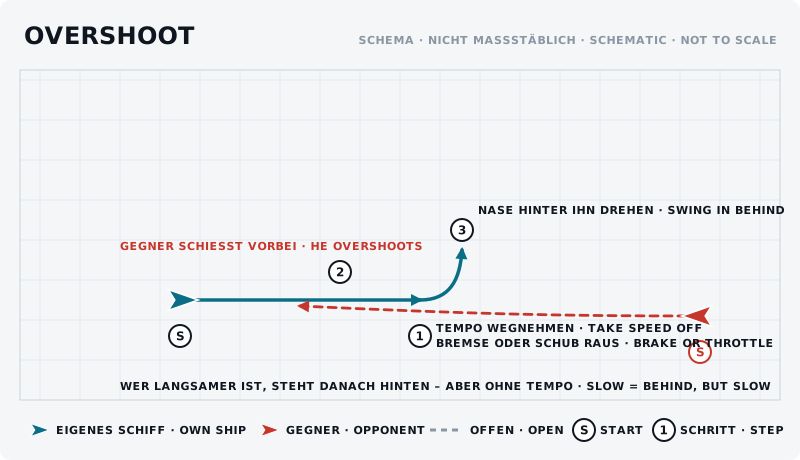
Die Skizze zeigt das Manöver von oben: eigenes Schiff blau, Gegner rot, Start mit „S“, Schritte nummeriert.
Was sollte der Gegner sehen?
Als Verfolger siehst du den Overshoot an einer Sache: Der Abstand schrumpft, ohne dass du schneller geworden bist. Wer nur auf das Fadenkreuz schaut, merkt es zu spät.
Typische Fehler
- Zu früh bremsen. Er hat Zeit zu korrigieren und sitzt danach noch besser.
- Bis zum Stillstand bremsen. Danach bist du ein stehendes Ziel.
- Als Verfolger nur auf das Fadenkreuz schauen. Der Abstand ist die Warnung.
- Nach dem Overshoot geradeaus weiterfliegen. Dann gibst du ihm die Position zurück.
Gegenmaßnahme des Gegners
Er erkennt das Bremsen und geht selbst in die Lag-Kurve – dann zieht er außen an dir vorbei, statt über dich hinweg, und bleibt hinter dir.
Übung
- Ziel
- Beide Rollen kennen: einen Overshoot erzwingen und einen vermeiden.
- Vorbereitung
- Zwei Piloten, abgesprochen, einer verfolgt. Freier Raum.
- Aufgabe
- Zehn Durchgänge. In den ersten fünf bremst der Verfolgte auf Ansage – der Verfolger versucht, nicht vorbeizuschießen. In den zweiten fünf bremst er ohne Ansage. Notiert, wie oft der Verfolger vorbeikommt und woran er es gemerkt hat.
- Erfolgskriterium
- Als Verfolgter erzwingst du den Overshoot mindestens einmal ohne Ansage; als Verfolger erkennst du ihn mindestens einmal rechtzeitig.
- Partner
- erforderlich
- Benötigte Funktionen
- Throttle - Increase
- Throttle - Decrease
- Boost
- Raumbremse
- Nach oben gleiten (abs.)
- Nach unten gleiten (abs.)
Anfänger-Variante
Übt nur den Verfolgerteil: hinter einem Partner herfliegen, der auf Ansage bremst, und rechtzeitig selbst Tempo wegnehmen.
Fortgeschrittene Variante
Overshoot ohne Ansage, mit entkoppeltem Modus: bremsen, Nase behalten, im Vorbeiziehen schießen.
Nächster Schritt
Wer den Overshoot auf beiden Seiten beherrscht, ist bereit für Kombinationen – Manöver, die aus mehreren dieser Bausteine bestehen.