Was ist das?
Missile Evasion ist die Reaktion auf eine anfliegende Rakete: quer zu ihrer Anflugrichtung fliegen und Gegenmaßnahmen setzen. Es gibt zwei Arten davon im Spiel – Köder und Störsignal –, und sie liegen auf zwei verschiedenen Funktionen.
Wann verwende ich es?
Defensiv, sofort. Sobald die Warnung kommt. Zeit zum Überlegen gibt es hier nicht.
Was will ich damit erreichen?
Du willst das Zeitfenster nutzen, in dem die Rakete noch korrigieren muss. Je querer du zu ihrer Linie stehst, desto mehr muss sie kurven – und desto wahrscheinlicher verliert sie dich.
Ausgangslage
Warnung im Cockpit, die Rakete ist unterwegs. Du hast noch Schub und Gegenmaßnahmen an Bord.
Ablauf Schritt für Schritt
- Richtung erkennen. Woher kommt sie? Angreifer erfassen hilft, die Richtung zu finden.
- Quer stellen. Nicht geradeaus fliehen – quer zur Anflugrichtung abkippen.
- Gegenmaßnahme setzen. Köder in Salve, und zwar während der Querbewegung, nicht davor.
- Bahn ändern. Nach der Salve weiter die Richtung ändern, damit sie nicht wieder aufschaltet.
- Kampf wieder aufnehmen. Nicht in die Flucht verfallen – nach dem Anflug ist der Schütze meist noch da.
Tastatur und Maus
Köder und Störsignal liegen im Standard auf zwei getrennten Tasten in Reichweite der linken Hand. Die Salvengröße stellst du vor dem Kampf ein, nicht während des Anflugs.
Zwei Arten von Gegenmaßnahmen, dazu alles, was die Flugbahn schnell ändert. Die Salvengröße der Köder lässt sich einstellen.
| Spielaktion | Standard Tastatur/Maus | Standard Joystick | Auslösung |
|---|---|---|---|
| Köder – Salve abgeben (tippen), Salve platzieren und abgeben (gedrückt halten) | H | Knopf 3 | halten |
| Störsignal – einsetzen (tippen) | J | Knopf 5 | einmal tippen |
| Köder – Salvenradius erhöhen (tippen) | Alt rechts + H | im Standard nicht belegt | einmal tippen |
| Köder – Salvenradius verringern (tippen) | Alt links + H | im Standard nicht belegt | einmal tippen |
| Nickachse | im Standard nicht belegt | Achse Y | Achse |
| Nach oben nicken | Pfeil runter | im Standard nicht belegt | einmal tippen |
| Throttle - Increase | W | im Standard nicht belegt | einmal tippen |
| Throttle - Decrease | S | im Standard nicht belegt | einmal tippen |
| Boost | Shift links | Knopf 8 | halten |
| Raumbremse | X | im Standard nicht belegt | einmal tippen |
| Erfassung durchlaufen – Angreifer – vorwärts | 4 | im Standard nicht belegt | einmal tippen |
Standardbelegung des Spiels, Spielstand 4.10.0 (11644). Hast du selbst umbelegt, gilt deine Belegung.
Was hier „im Standard nicht belegt“ heißt, musst du in den Spieleinstellungen selbst auf eine Taste oder Achse legen – wir raten keine.
HOTAS/HOSAS: die Joystickspalte ist die Standardbelegung EINES Sticks. Auf zwei Stöcken ordnest du Nicken, Gieren, Rollen und das seitliche Gleiten selbst zu – welche Achse ein Manöver braucht, steht im Abschnitt HOTAS / HOSAS.
HOTAS / HOSAS
Ein Manöver braucht keine bestimmten Tasten, sondern bestimmte Achsen und Funktionen. Wer HOTAS oder HOSAS fliegt, ordnet sie einmal zu und liest dann nur noch, welche davon ein Manöver verlangt:
- Nicken, Gieren, Rollen – die drei Drehachsen. Im Standard liegen sie auf einem Stick auf X, Y und der Drehachse Rz.
- Gleiten X/Y/Z – seitlich, hoch/runter, vor/zurück. Im Standard sind das einzelne Knöpfe und ein Hut, keine Achsen; auf HOSAS legt man sie sinnvoll auf die Achsen des zweiten Sticks.
- Schub – der Schubregler oder die Vorwärts-/Rückwärtsfunktion.
- Boost, Raumbremse, entkoppelter Modus – drei Knöpfe, die du im Kampf blind treffen musst.
- Zielerfassung – mindestens „Ziel unter dem Fadenkreuz erfassen“ auf einem Daumenknopf.
Welche davon im Standard schon belegt sind, steht in der Tabelle oben. Alles, was dort „im Standard nicht belegt“ heißt, legst du selbst.
Gebraucht werden zwei Knöpfe für Köder und Störsignal – beide blind erreichbar – sowie Nicken/Rollen und Schub. Im Standard liegen Köder und Störsignal auf Joystick-Knöpfen; prüfe in der Tabelle, welche das sind.
Geschwindigkeit und Energie
Boost hilft, aus dem Anflugkegel zu kommen, macht dich aber auch heller und schneller berechenbar. Eine Querbewegung ohne Boost ist meist besser als eine Flucht mit Boost.
Bewegungsdiagramm
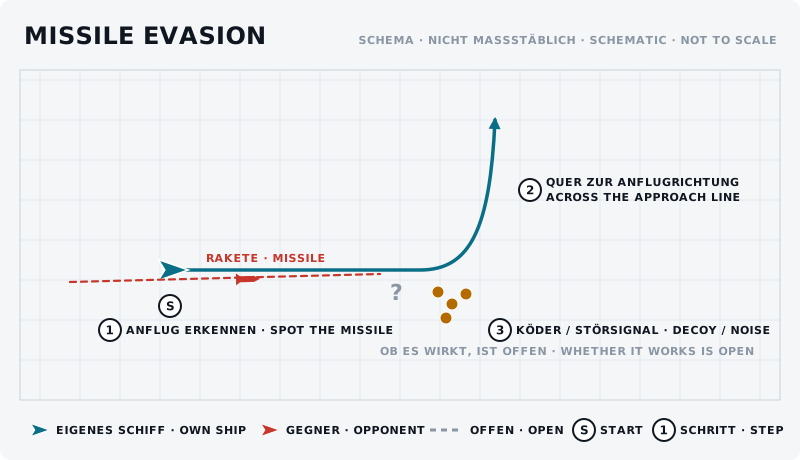
Die Skizze zeigt das Manöver von oben: eigenes Schiff blau, Gegner rot, Start mit „S“, Schritte nummeriert.
Was sollte der Gegner sehen?
Er sieht, ob du reagierst. Wer nach der ersten Warnung gar nichts tut, bekommt die zweite Rakete. Wer jedes Mal dasselbe tut, bekommt sie aus der anderen Richtung.
Typische Fehler
- Geradeaus fliehen. Die einfachste Aufgabe, die du einer Rakete stellen kannst.
- Köder zuerst, Bewegung später. Die Salve nützt wenig, wenn du noch auf der alten Bahn bist.
- Alle Gegenmaßnahmen auf einmal. Danach hast du keine mehr, und der Kampf dauert noch.
- Nach dem Ausweichen weiterfliehen. Der Schütze ist noch da und hat jetzt freie Bahn.
Gegenmaßnahme des Gegners
Er schießt zwei Raketen kurz nacheinander, damit die erste deine Gegenmaßnahmen zieht. Oder er wartet, bis du die Querbewegung beginnst, und setzt die Rakete in deine neue Richtung.
Übung
- Ziel
- Die Reihenfolge Warnung – quer – Gegenmaßnahme ohne Nachdenken abrufen können.
- Vorbereitung
- Ein Partner mit Raketen, abgesprochen, im freien Raum. Erst ohne Beschuss üben, dann mit.
- Aufgabe
- Zehn Anflüge. Der Partner meldet den Abschuss. Du drehst quer zur Anflugrichtung, setzt Köder, hältst Tempo. Notiert, bei welchem Abstand du reagiert hast und was passiert ist.
- Erfolgskriterium
- Du reagierst auf die Warnung, ohne erst zu suchen, und fliegst die Querbewegung, bevor du an die Gegenmaßnahme denkst.
- Partner
- erforderlich
- Benötigte Funktionen
- Köder – Salve abgeben (tippen), Salve platzieren und abgeben (gedrückt halten)
- Störsignal – einsetzen (tippen)
- Köder – Salvenradius erhöhen (tippen)
- Köder – Salvenradius verringern (tippen)
- Nickachse
- Nach oben nicken
Anfänger-Variante
Übt ohne Gegner: Köder und Störsignal blind finden, während ihr fliegt. Erst wenn das sitzt, mit Partner und Raketen.
Fortgeschrittene Variante
Missile Evasion mitten im Kurvenkampf, ohne den Kampf abzubrechen: ausweichen, Gegenmaßnahme, und im selben Zug zurück in die Wende.
Nächster Schritt
Wer laufend ausweichen muss, statt zu kämpfen, braucht die Defensive Spirale – und früher ein besseres Lagebild.