Was ist das?
Gleiten heißt: Schub quer zur Blickrichtung. Dein Schiff bewegt sich dorthin, wo die Nase nicht hinzeigt. Damit lassen sich Zielen und Fliegen trennen – im Raum ist das erlaubt, in der Atmosphäre kaum.
Wann verwende ich es?
Immer. Gleiten ist kein einzelnes Manöver, sondern eine Zutat: im Orbit, gegen das Vorhalten, beim Ausweichen, beim Andocken.
Was will ich damit erreichen?
Du willst zielen, ohne dahin zu fliegen, wohin du zielst – und dich bewegen, ohne die Nase mitzunehmen.
Ausgangslage
Jede Kampflage. Wichtig ist nur, dass du Schub übrig hast: Gleiten und Vorwärtsschub teilen sich die Triebwerksleistung.
Ablauf Schritt für Schritt
- Nase festhalten. Zuerst den Gegner ins Fadenkreuz, dann erst gleiten.
- Eine Richtung wählen. Seitlich, um am Gegner vorbeizuziehen; hoch oder runter, um aus seiner Ebene zu kommen.
- Vorwärtsschub dazu. Erst die Kombination aus Vorwärts und Quer ergibt eine schräge Bahn statt eines Schlenkers.
- Kurz halten, dann ändern. Dauergleiten in eine Richtung ist nur eine neue Gerade.
- Auf die Geschwindigkeit achten. Gleiten zieht Leistung von der Vorwärtsbewegung ab; im Kurvenkampf merkst du das sofort.
Tastatur und Maus
Auf der Tastatur liegen die vier wichtigsten Richtungen im Standard rund um die linke Hand. Wer sie mit dem Schub kombiniert, hat fünf Finger gleichzeitig beschäftigt – genau deshalb lohnt sich hier ein zweiter Stick.
Gleiten geht in sechs Richtungen: hoch, runter, links, rechts, vor, zurück. Im Standard liegen sie auf einzelnen Tasten und Knöpfen; als Achsen muss man sie selbst belegen.
| Spielaktion | Standard Tastatur/Maus | Standard Joystick | Auslösung |
|---|---|---|---|
| Nach links/rechts gleiten (abs.) | im Standard nicht belegt | im Standard nicht belegt | Achse |
| Nach oben/unten gleiten (abs.) | im Standard nicht belegt | im Standard nicht belegt | Achse |
| Throttle - Forward / Back | im Standard nicht belegt | im Standard nicht belegt | Achse |
| Nach oben gleiten (abs.) | Leertaste | Knopf 9 | einmal tippen |
| Nach unten gleiten (abs.) | Strg links | Knopf 10 | einmal tippen |
| Nach links gleiten (abs.) | A | Hut 1 links | einmal tippen |
| Nach rechts gleiten (abs.) | D | Hut 1 rechts | einmal tippen |
| Throttle - Increase | W | im Standard nicht belegt | einmal tippen |
| Throttle - Decrease | S | im Standard nicht belegt | einmal tippen |
| Entkoppelten Modus aktiveren/deaktivieren | C | im Standard nicht belegt | umschalten |
Standardbelegung des Spiels, Spielstand 4.10.0 (11644). Hast du selbst umbelegt, gilt deine Belegung.
Was hier „im Standard nicht belegt“ heißt, musst du in den Spieleinstellungen selbst auf eine Taste oder Achse legen – wir raten keine.
HOTAS/HOSAS: die Joystickspalte ist die Standardbelegung EINES Sticks. Auf zwei Stöcken ordnest du Nicken, Gieren, Rollen und das seitliche Gleiten selbst zu – welche Achse ein Manöver braucht, steht im Abschnitt HOTAS / HOSAS.
HOTAS / HOSAS
Ein Manöver braucht keine bestimmten Tasten, sondern bestimmte Achsen und Funktionen. Wer HOTAS oder HOSAS fliegt, ordnet sie einmal zu und liest dann nur noch, welche davon ein Manöver verlangt:
- Nicken, Gieren, Rollen – die drei Drehachsen. Im Standard liegen sie auf einem Stick auf X, Y und der Drehachse Rz.
- Gleiten X/Y/Z – seitlich, hoch/runter, vor/zurück. Im Standard sind das einzelne Knöpfe und ein Hut, keine Achsen; auf HOSAS legt man sie sinnvoll auf die Achsen des zweiten Sticks.
- Schub – der Schubregler oder die Vorwärts-/Rückwärtsfunktion.
- Boost, Raumbremse, entkoppelter Modus – drei Knöpfe, die du im Kampf blind treffen musst.
- Zielerfassung – mindestens „Ziel unter dem Fadenkreuz erfassen“ auf einem Daumenknopf.
Welche davon im Standard schon belegt sind, steht in der Tabelle oben. Alles, was dort „im Standard nicht belegt“ heißt, legst du selbst.
Das sind die Achsen Gleiten X (seitlich), Gleiten Y (hoch/runter) und Gleiten Z (vor/zurück). Im Standard sind sie auf einem Joystick nicht als Achsen belegt, sondern auf Knöpfe und einen Hut verteilt. Auf HOSAS gehören X und Y auf den linken Stick – das ist der eigentliche Grund, zwei Stöcke zu fliegen.
Geschwindigkeit und Energie
Gleiten und Vorwärtsschub teilen sich die Leistung. Wer dauerhaft quer gleitet, ist vorwärts langsamer – im Kurvenkampf kann das den Unterschied machen. Kurze, kräftige Gleitimpulse sind meist besser als dauerhaftes Gleiten.
Bewegungsdiagramm
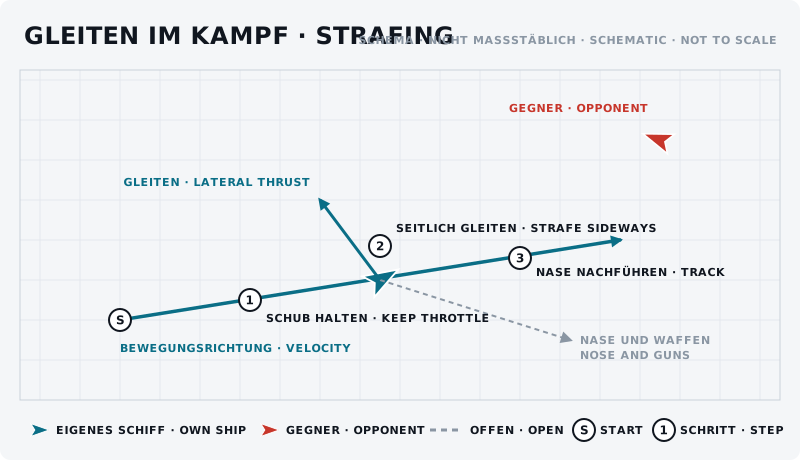
Die Skizze zeigt das Manöver von oben: eigenes Schiff blau, Gegner rot, Start mit „S“, Schritte nummeriert.
Was sollte der Gegner sehen?
Er sieht ein Schiff, dessen Nase und Bahn nicht zusammenpassen. Das macht sein Vorhalten schwierig – und verrät ihm gleichzeitig, dass du weißt, was du tust.
Typische Fehler
- Gleiten statt Wenden. Gleiten ersetzt keine Wende; es ergänzt sie.
- Dauergleiten. Eine neue Gerade ist keine Verbesserung.
- Nase mitnehmen. Wer beim Gleiten die Nase mitschwenkt, hat nichts gewonnen.
- Zu viel gleichzeitig. Erst Nase halten, dann eine Gleitrichtung, dann Schub – in dieser Reihenfolge lernen.
Gegenmaßnahme des Gegners
Er geht näher heran, weil die Querbewegung auf kurze Distanz weniger ausmacht, oder er wechselt auf feste Waffen und zielt von Hand.
Übung
- Ziel
- Um einen stehenden Partner herumgleiten, ohne die Nase von ihm zu nehmen.
- Vorbereitung
- Ein Partner steht still. Freier Raum, kein Zeitdruck.
- Aufgabe
- Haltet die Nase auf ihm und fliegt allein mit den Gleitrichtungen ein Quadrat um ihn herum: hoch, rechts, runter, links. Danach dasselbe schräg. Zum Schluss mit Vorwärtsschub kombiniert.
- Erfolgskriterium
- Der Partner bleibt während des ganzen Quadrats im Fadenkreuz.
- Partner
- erforderlich
- Benötigte Funktionen
- Nach links/rechts gleiten (abs.)
- Nach oben/unten gleiten (abs.)
- Throttle - Forward / Back
- Nach oben gleiten (abs.)
- Nach unten gleiten (abs.)
- Nach links gleiten (abs.)
Anfänger-Variante
Übt das Quadrat um einen stehenden Partner. Nichts anderes. Das ist die Grundlage für alles Weitere.
Fortgeschrittene Variante
Gleiten im Kurvenkampf: Haltet einen Orbit und ändert dabei zweimal die Gleitrichtung, ohne den Kreis zu verlieren.
Nächster Schritt
Wer Nase und Bahn ganz trennen will, fliegt Decoupled. Wer damit Schüsse ins Leere laufen lassen will: Pip-Manipulation.