What is it?
The lead turn is a turn that begins before the pass. Instead of flying straight until the merge and turning afterwards, you already pull the nose towards the opponent during the approach.
When do I use it?
Offensive, on an approach to an opponent who is flying straight or has not started turning. Especially against opponents who wait for the merge.
What do I want to achieve?
You want angle for free: whoever turns first has part of the turn behind him when they meet. The other has to make that up first.
Starting position
Approach on a reciprocal course, opponent locked, distance still big enough that he cannot answer your turn immediately.
Step by step
- Lock and read the distance. Without a feel for distance the lead turn is guesswork.
- Cap your speed. As with the merge: too fast makes the early turn wide and worthless.
- Turn in early. Pull the nose in the direction he is flying – not at him.
- Hold the turn. Keep pulling while he is still coming straight.
- Meet already turned. When you meet your nose is almost on him, his is not yet on you.
- Straight on. The lead turn becomes a rate fight without a pause.
Keyboard and mouse
The movement is the same as in any turn – the timing is what matters. A glance at the locked target’s distance replaces any gut feeling here.
As for the merge, but timing is everything: targeting to judge the distance, rotation axes for the early turn, throttle for the rest.
| Game action | Default keyboard/mouse | Default joystick | Trigger |
|---|---|---|---|
| Pitch | not bound by default | Axis Y | axis |
| Pitch up | Arrow down | not bound by default | single press |
| Pitch down | Arrow up | not bound by default | single press |
| Yaw | not bound by default | Axis X | axis |
| Yaw left | Arrow left | not bound by default | single press |
| Yaw right | Arrow right | not bound by default | single press |
| Roll | not bound by default | Axis Rz (twist) | axis |
| Roll left | Q | not bound by default | single press |
| Roll right | E | not bound by default | single press |
| Throttle - Increase | W | not bound by default | single press |
| Throttle - Decrease | S | not bound by default | single press |
| Lock Target Under Reticle | not bound by default | not bound by default | single press |
| Cycle Lock - Hostiles - Forward | 5 | not bound by default | single press |
| Lock Selected Target | not bound by default | not bound by default | single press |
| Speed Limiter - Enable / Disable | not bound by default | not bound by default | toggle |
| Speed Limiter - Step Up (tap) | Left Alt + Mouse wheel up | not bound by default | single press |
| Speed Limiter - Step Down (tap) | Left Alt + Mouse wheel down | not bound by default | single press |
Game default binding, game version 4.10.0 (11644). If you rebound it yourself, your binding applies.
Anything marked “not bound by default” you have to bind yourself in the game settings – we do not guess a key.
HOTAS/HOSAS: the joystick column is the default binding of ONE stick. On two sticks you assign pitch, yaw, roll and lateral strafe yourself – which axis a manoeuvre needs is listed in the HOTAS / HOSAS section.
HOTAS / HOSAS
A manoeuvre does not need particular keys, it needs particular axes and functions. If you fly HOTAS or HOSAS you assign them once and then only read which of them a manoeuvre asks for:
- Pitch, yaw, roll – the three rotation axes. By default on one stick they sit on X, Y and the twist axis Rz.
- Strafe X/Y/Z – sideways, up/down, forward/back. By default these are single buttons and a hat, not axes; on HOSAS you put them on the second stick’s axes.
- Throttle – the throttle lever or the forward/back function.
- Boost, space brake, decoupled mode – three buttons you must hit blind in a fight.
- Targeting – at least “lock target under reticle” on a thumb button.
Which of these are bound by default is in the table above. Everything marked “not bound by default” you assign yourself.
You need pitch, roll and throttle. No extra button – the lead turn is pure timing, not technique.
Speed and energy
The lead turn costs nothing but speed you should be taking off anyway. That is exactly what makes it so good: it is the only angle gain that costs neither boost nor altitude.
Movement diagram
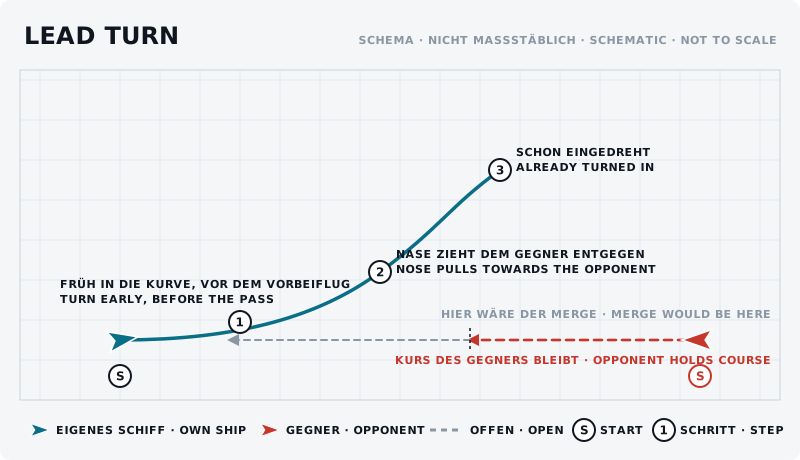
The sketch shows the manoeuvre from above: own ship blue, opponent red, start marked “S”, steps numbered.
What should the opponent see?
He sees you turning away and easily mistakes it for a retreat. If he then keeps flying straight you have won. Experienced opponents turn with you immediately – then you have an early, tight turning fight instead of a merge.
Typical mistakes
- Too early. He passes behind you and you flew the turn for nothing.
- Too late. Then it is an ordinary merge.
- Turning at him instead of in his direction. The lead turn aims at the point where he will be.
- At full throttle. Makes the turn so wide that the head start evaporates.
Opponent’s counter
He turns with you as soon as he sees your turn – then you are level again. Or he pulls out vertically so your early turn ends up in the wrong plane.
Exercise
- Goal
- Find the right moment to start the turn early.
- Preparation
- A partner flies a fixed, straight path and does not change it. Open space.
- Task
- Ten approaches. Start the turn a little earlier each time than on the previous run. Note from when you already have the nose on him at the meeting point – and from when you turn too early and he passes behind you.
- Success criterion
- You hit the timing twice in a row so that you are already turned in when you meet.
- Partner
- required
- Functions needed
- Pitch
- Pitch up
- Pitch down
- Yaw
- Yaw left
- Yaw right
Beginner variant
Fly against a partner who holds a stubbornly straight course and just try out the timing.
Advanced variant
Lead turn against a partner who also flies a lead turn. Turning too early loses – that is the real exercise.
Next step
A lead turn almost always becomes a rate fight. If he does not follow, pursuit curves show what comes next.