What is it?
A tight turn is not the same as a fast turn. The tightest turn has the smallest diameter, the fastest needs the least time for a full lap. Both depend on speed – and on boost.
When do I use it?
Whenever a turning fight goes over several laps. At the latest when you notice you are neither gaining nor losing angle.
What do I want to achieve?
You want to know which turn your ship actually has – and then set it deliberately instead of doing the same thing in every turn.
Starting position
Turning fight, both ships have speed, neither has a clear angle advantage.
Step by step
- Decide what you need. Angle per time (rate) or distance saved (radius)?
- Set the speed. Via the speed limiter, not the throttle lever – that is reproducible.
- Consider the acceleration limiter. It decides how hard your ship enters the turn.
- Use boost deliberately. Boost makes you faster and your circle wider. For a single turn that can be enough; over several laps usually not.
- Hold the turn. Pull evenly, do not pump.
- Assess after the lap. Gained angle? Then stay with it.
Keyboard and mouse
Speed limiter and acceleration limiter are both bound by default to the mouse wheel with different modifiers. Remember which is which – in a fight there is no time to look it up.
Boost, space brake, speed limiter and acceleration limiter – the four adjustments with which you change the shape of your turn.
| Game action | Default keyboard/mouse | Default joystick | Trigger |
|---|---|---|---|
| Throttle - Increase | W | not bound by default | single press |
| Throttle - Decrease | S | not bound by default | single press |
| Boost | Left Shift | Button 8 | hold |
| Spacebrake | X | not bound by default | single press |
| Speed Limiter - Enable / Disable | not bound by default | not bound by default | toggle |
| Speed Limiter - Step Up (tap) | Left Alt + Mouse wheel up | not bound by default | single press |
| Speed Limiter - Step Down (tap) | Left Alt + Mouse wheel down | not bound by default | single press |
| Acceleration Limiter - Step Up (tap) | Right Alt + Mouse wheel up | not bound by default | single press |
| Acceleration Limiter - Step Down (tap) | Right Alt + Mouse wheel down | not bound by default | single press |
| Reset Flight Accelerometer | Right Alt + C | not bound by default | single press |
| Pitch | not bound by default | Axis Y | axis |
| Pitch up | Arrow down | not bound by default | single press |
Game default binding, game version 4.10.0 (11644). If you rebound it yourself, your binding applies.
Anything marked “not bound by default” you have to bind yourself in the game settings – we do not guess a key.
HOTAS/HOSAS: the joystick column is the default binding of ONE stick. On two sticks you assign pitch, yaw, roll and lateral strafe yourself – which axis a manoeuvre needs is listed in the HOTAS / HOSAS section.
HOTAS / HOSAS
A manoeuvre does not need particular keys, it needs particular axes and functions. If you fly HOTAS or HOSAS you assign them once and then only read which of them a manoeuvre asks for:
- Pitch, yaw, roll – the three rotation axes. By default on one stick they sit on X, Y and the twist axis Rz.
- Strafe X/Y/Z – sideways, up/down, forward/back. By default these are single buttons and a hat, not axes; on HOSAS you put them on the second stick’s axes.
- Throttle – the throttle lever or the forward/back function.
- Boost, space brake, decoupled mode – three buttons you must hit blind in a fight.
- Targeting – at least “lock target under reticle” on a thumb button.
Which of these are bound by default is in the table above. Everything marked “not bound by default” you assign yourself.
You need pitch, roll, a stepless throttle and the boost button. Putting the speed limiter on a rotary lets you hold your turn speed in a fight instead of hunting for it in steps.
Speed and energy
This is the core of this guide: speed is energy, and a turn spends energy. Boost adds energy but widens the circle. Braking tightens the circle but costs the energy you will need later to break out. Every turn is this calculation.
Movement diagram
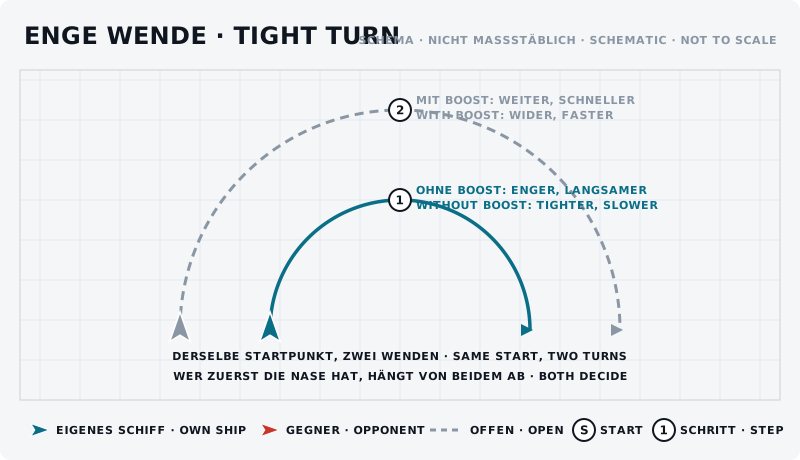
The sketch shows the manoeuvre from above: own ship blue, opponent red, start marked “S”, steps numbered.
What should the opponent see?
He sees whether you boost – on your engines and in how wide your circle gets. An opponent who knows you have just spent boost simply waits.
Typical mistakes
- Constant boost in the turn. Widens the circle until any angle gain disappears.
- Pumping instead of pulling. Uneven pulling costs more energy than a constant turn.
- Braking to a standstill. A stationary ship does not turn, it only rotates.
- Always the same setting. Rate and radius need different speeds.
Opponent’s counter
He settles on the turn you always fly. Anyone who never changes his turn is worked out after three laps.
Exercise
- Goal
- Find out for your own ship which turn is tighter and which is faster.
- Preparation
- Alone, open space, one fixed reference point. Rough timing by your own clock.
- Task
- Fly five full turns each: (a) full speed without boost, (b) capped without boost, (c) with boost. Time them and estimate the diameter against the reference point. Write down the three results – that is your ship’s data sheet.
- Success criterion
- You can say at which speed your ship turns fastest and at which it turns tightest.
- Partner
- required
- Functions needed
- Throttle - Increase
- Throttle - Decrease
- Boost
- Spacebrake
- Speed Limiter - Enable / Disable
- Speed Limiter - Step Up (tap)
Beginner variant
Fly the three turns from the exercise and write down the times. That is enough to begin with.
Advanced variant
The same with three different ships, then compare the data sheets. After that you know which of your ships wants which kind of fight.
Next step
What else energy means in a fight – shields, weapons, thrusters – is in energy and power management.