What is it?
In normal coupled mode your ship follows the nose. In decoupled mode it does not: course and speed stay as they are and the nose rotates freely around them.
When do I use it?
When you have to fly one way and shoot another: retreating with covering fire to the rear, during a pass, turning in the tightest space.
What do I want to achieve?
You want to separate course and nose completely – further than strafing can. This lets you fly manoeuvres a coupled ship cannot.
Starting position
You have speed and room. Decoupling at low speed without a plan is the fastest way to end up helpless.
Step by step
- Know where you are going first. The course you have when you decouple is the one you keep.
- Decouple. Switch over.
- Rotate the nose. Freely, as far as you like – even all the way back.
- Correct the course. With the strafe directions, not with the nose.
- Couple again in time. Switch back before you fly into something. That is the step everyone forgets.
Keyboard and mouse
The toggle is bound by default to a key you can reach blind in a fight. What matters is not switching but switching back – give yourself a fixed trigger for it, for example “as soon as my nose is forward again”.
One switch for the mode, the rotation axes for the nose, the strafe directions for the course – and the space brake, because in decoupled mode nothing slows down by itself.
| Game action | Default keyboard/mouse | Default joystick | Trigger |
|---|---|---|---|
| Enable / Disable decoupled mode | C | not bound by default | toggle |
| Pitch | not bound by default | Axis Y | axis |
| Pitch up | Arrow down | not bound by default | single press |
| Pitch down | Arrow up | not bound by default | single press |
| Yaw | not bound by default | Axis X | axis |
| Yaw left | Arrow left | not bound by default | single press |
| Yaw right | Arrow right | not bound by default | single press |
| Roll | not bound by default | Axis Rz (twist) | axis |
| Roll left | Q | not bound by default | single press |
| Roll right | E | not bound by default | single press |
| Strafe up (abs.) | Space | Button 9 | single press |
| Strafe down (abs.) | Left Ctrl | Button 10 | single press |
| Strafe left (abs.) | A | Hat 1 left | single press |
| Strafe right (abs.) | D | Hat 1 right | single press |
| Spacebrake | X | not bound by default | single press |
Game default binding, game version 4.10.0 (11644). If you rebound it yourself, your binding applies.
Anything marked “not bound by default” you have to bind yourself in the game settings – we do not guess a key.
HOTAS/HOSAS: the joystick column is the default binding of ONE stick. On two sticks you assign pitch, yaw, roll and lateral strafe yourself – which axis a manoeuvre needs is listed in the HOTAS / HOSAS section.
HOTAS / HOSAS
A manoeuvre does not need particular keys, it needs particular axes and functions. If you fly HOTAS or HOSAS you assign them once and then only read which of them a manoeuvre asks for:
- Pitch, yaw, roll – the three rotation axes. By default on one stick they sit on X, Y and the twist axis Rz.
- Strafe X/Y/Z – sideways, up/down, forward/back. By default these are single buttons and a hat, not axes; on HOSAS you put them on the second stick’s axes.
- Throttle – the throttle lever or the forward/back function.
- Boost, space brake, decoupled mode – three buttons you must hit blind in a fight.
- Targeting – at least “lock target under reticle” on a thumb button.
Which of these are bound by default is in the table above. Everything marked “not bound by default” you assign yourself.
You need the decoupled toggle, all three rotation axes and the strafe axes. On HOSAS this is the most natural control form there is: the left stick moves the ship, the right one rotates the nose.
Speed and energy
In decoupled mode nothing brakes. The space brake is your only way to lose speed – and it costs time. Anyone who flies decoupled into a station or an asteroid has not thought the manoeuvre through.
Movement diagram
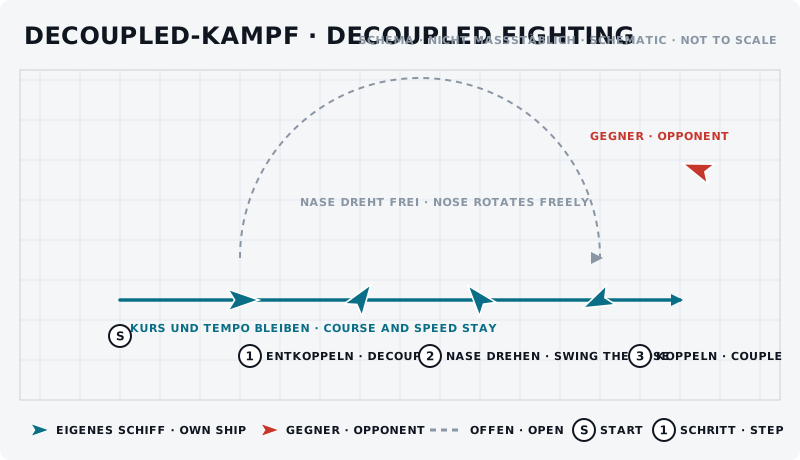
The sketch shows the manoeuvre from above: own ship blue, opponent red, start marked “S”, steps numbered.
What should the opponent see?
He sees a ship flying sideways or backwards that still aims at him. That is hard for him to read – as long as you do not come to a stop.
Typical mistakes
- Forgetting to switch back. By far the most common mistake, and it usually ends at a wall.
- Decoupling at low speed. Then your ship stands still and only rotates.
- Trying to correct the course with the nose. In decoupled mode the nose changes nothing about the course.
- Decoupled into an unknown direction. The course stays – even if there is an asteroid there.
Opponent’s counter
He waits until you have lost speed in decoupled mode and then attacks – a stationary decoupled ship is the easiest target in space.
Exercise
- Goal
- Rotate the nose 180 degrees in decoupled mode without losing your course – and switch back in time.
- Preparation
- Open space, one reference point ahead, a partner as observer.
- Task
- Fly towards the reference point, decouple, rotate the nose 180 degrees, hold for three seconds, rotate back and couple again. The partner reports whether your course changed. Ten runs.
- Success criterion
- You rotate and couple back without losing your original course and without accelerating unintentionally.
- Partner
- required
- Functions needed
- Enable / Disable decoupled mode
- Pitch
- Pitch up
- Pitch down
- Yaw
- Yaw left
Beginner variant
Practise only switching and switching back, in empty space, without an opponent, until both come without thinking.
Advanced variant
Decoupled retreat: fly away from the partner, rotate the nose back, keep him in the reticle and couple back before you are out of his range.
Next step
Decoupled you can force an overshoot cleanly – and the defensive spiral becomes much harder to read.