OMC FLY SAFE. FLY TOGETHER.
BalduursGATE Field ManualMining – from scan to cargo4.10.0-hotfix (55227) · Version 1 · Sourced
FM · MINING · MINING-ABLAUF · guide.mining-ablaufOnline version: https://oldmensclub.de/citizen-hub/academy/mining-ablauf.en.html
BalduursGATE Field Manual · Academy · Edition 1
MiningLevel: Beginner

Mining – from scan to cargo

The ten steps of ship mining with the matching control functions – what of it is in the game data and what still has to be tested.

Valid from patch
4.10.0
Game data version
4.10.0-hotfix (55227)
Version
1
Updated
2026-09-11
Review statusSourced

Every control function and game object used exists in the current game version. The statements come from the sources listed.

Review path and sources

Editorial in-game review

Nobody from the editorial team has flown it in game yet. The information comes from the sources listed below.

What you will learn

  • Know the steps from scan to cargo and put them in order.
  • Find the matching control functions for each step.
  • Tell which steps are sourced and which are still being tested.

Prerequisites

What this is about

This guide goes from scan to cargo in ten steps. Each step lists the matching control functions – with their names from the game data, without keys.q3 Anything we would only know from experience is deliberately in “Not yet confirmed” boxes.
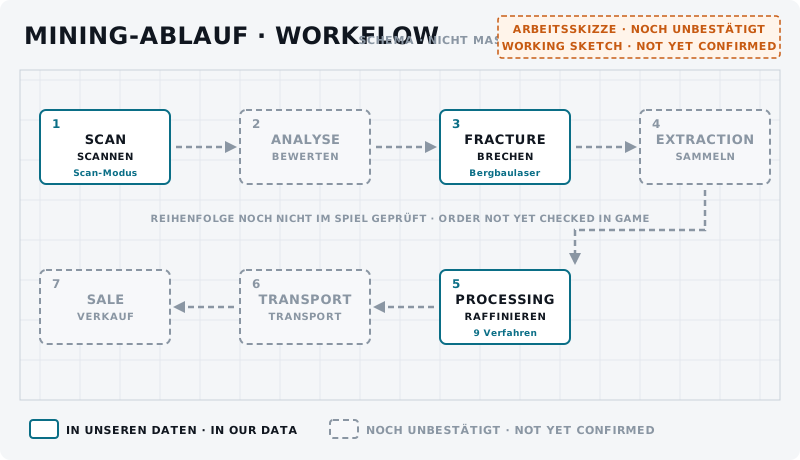
Flow chart with seven boxes: scan, analysis, fracture, extraction, processing, transport, sale; three boxes solid, four dashed.
DiagramMining workflow – overview UNCONFIRMEDSeven stations from scan to sale. Solid: game data exists (scanning mode, mining laser, refining processes). Dashed: no data yet. The order has not been checked in game yet.Own graphic · claude-entwurf, 2026-09-11

1. Preparation

In our game data three ships carry a mining laser slot: MISC Prospector, Argo MOLE and Drake Golem.q2 The details are in Prospector – mining guide and MOLE – crew mining guide.

Before you start, put this guide's functions on keys or your Stream Deck – the list is below.

Jettison Cargo is a function of its own in mining mode and is bound in the default profile.q3 Place it so you do not trigger it by accident.
If something goes wrong: the MAYDAY key in the BalduursGATE client sends a distress call with your location to the crew.

2. Find an area

Where which ore is found is not in our game data. We do know the ores themselves – see Mining materials explained.

3. Scanning

The controls have Toggle Scanning Operator Mode and Set Scanning Operator Mode, plus Increase and Decrease scanning angle.q3 Activate Scanning and Activate Ping only work while you hold the key.q3 The functions in detail: Scanning – Basics.

training.mining-scan.01BeginnerUNCONFIRMED
Goal
Find scanning mode and the scanning functions on your own bindings.
Preparation
In a mining ship, landed or in open space.
Task
Switch scanning mode on. Change the scanning angle both ways, hold “Activate Scanning” and trigger “Activate Ping”. Note what changes on the display.
Success criterion
You find every function without searching and know which ones you have to hold.
Partner
not required
Functions needed
  • Toggle Scanning Operator Mode
  • Increase Scanning Angle
  • Decrease Scanning Angle
  • Activate Ping (Hold & Release)

4. Assess the find

How you tell from the scan whether a rock is worth it is not sourced in our data. Which scan values exist and what is still open: Fracturing explained.

5. Mining mode

Toggle Mining Operator Mode is bound in the default profile; Set Mining Operator Mode switches it on directly.q3 For the selection menu there is Mining Mode Actions - PIT Category.q3

training.mining-mode.01BeginnerUNCONFIRMED
Goal
Switch mining mode on and off and get to know the laser functions.
Preparation
In a mining ship in open space, with no rock in front of the laser.
Task
Switch mining mode on, fire the laser, increase and decrease power, toggle “Toggle Laser Beam (High / low)” and leave mining mode again. Note what changes on the display.
Success criterion
You can trigger every function and leave mining mode again.
Partner
not required
Functions needed
  • Toggle Mining Operator Mode
  • Fire Mining Laser (Toggle)
  • Increase Mining Laser Power
  • Decrease Mining Laser Power
  • Toggle Laser Beam (High / low)

6. Fracturing

Fire Mining Laser (Toggle) – a short tap toggles, holding fires for as long as you hold.q3 You control power with Increase and Decrease Mining Laser Power; there are also Toggle Laser Beam (High / low) and Activate Mining Module (Slot 1 to 3).q3

More: Fracturing explained, Mining heads explained and Mining modules & consumables.

How much power a rock needs and what happens with too much is not in our data.

7. Extraction

The controls have Switch Mining Laser (Toggle).q3

Whether this switch is the step from breaking to collecting we are still checking in game. Details: Extraction & cargo.

8. Check the cargo

The blueprints list dedicated ore pods, such as “MISC Ore Pod” and “Argo Ore Pod”.q1

How much an ore pod holds and where you can read the cargo is not in our data.

9. Flight back

According to their stock fit, Prospector, MOLE and Golem carry a quantum drive.q2

What to watch out for on the way back with a full load we add after a test.

10. Next processing

The game data knows nine refining processes.q1 How it continues: Refinery – what happens after mining? and From ore to sale.

Checklist

  • Scanning mode, scanning angle and “Activate Scanning” are bound.
  • You find mining mode, fire laser and power +/− without searching.
  • The three module slots are on keys or your Stream Deck.
  • You know where “Jettison Cargo” is – and do not trigger it by accident.
  • MAYDAY in the BalduursGATE client is set up.

On your Stream Deck

These functions belong to this topic. Which key that is for you is shown by the BalduursGATE plugin based on your own bindings – on purpose, no key is listed here.

Profile page SCANNING

  • Toggle Scanning Operator Mode
  • Set Scanning Operator Mode
  • Increase Scanning Angle
  • Decrease Scanning Angle
  • MFD - Set Page - Scanning (Short Press)
  • MFD - Set Page - Scanning (Long Press)
  • Activate Ping (Hold & Release)

Profile page POWER

  • Toggle Power - All
  • Toggle Power - Thrusters
  • Toggle Power - Shields
  • Toggle Power - Weapons

Profile page MINING

  • Toggle Mining Operator Mode
  • Set Mining Operator Mode
  • Fire Mining Laser (Toggle)
  • Switch Mining Laser (Toggle)
  • Increase Mining Laser Power
  • Decrease Mining Laser Power
  • Toggle Laser Beam (High / low)
  • Activate Mining Module (Slot 1)
  • Activate Mining Module (Slot 2)
  • Activate Mining Module (Slot 3)
  • Jettison Cargo
  • Mining Mode Actions - PIT Category

Profile page BalduursGATE Live

  • MAYDAY – distress call

The profile page CARGO is part of OMC Stream Deck 0.9.0. Go to the Download Center →

Read next

Links are stored in the hub entry – the index computes the reverse direction. No address is hard-coded here.

← Back to the Academy

Sources

  1. q1GAME DATAChronist – Auszug aus der Data.p4k: Schiffsbauteile, Rohstoffe, Raffinerieverfahren, Baupläne, Orte (chronist/index.json)Build 4.10.0-hotfix (55227)Gelesen, nicht gedeutet. Namen teils aus der deutschen global.ini, teils englisch.
  2. q2GAME DATAChronist – Steckplätze und Werksbestückung je Schiff (chronist/steckplaetze.json)Build 4.10.0-hotfix (55227)
  3. q3GAME DATAACTION-MASTER – Steuerungsfunktionen aus defaultProfile.xml und global.ini (SC-4.10-ACTION-MASTER.json)Build 4.10.0-hotfix (55227)Namen, Gruppen, Auslöseart und Standardbelegung (belegt ja/nein) gelesen – keine Tasten.

Patch and version information

Valid from
4.10.0
Valid until
open
Game data version
4.10.0-hotfix (55227)
Version
1 · EN Version 1
Review entries
none
Identifier
guide.mining-ablauf