OMC FLY SAFE. FLY TOGETHER.
BalduursGATE Field ManualFracturing explained4.10.0-hotfix (55227) · Version 1 · Sourced
FM · MINING · MINING-FRACTURING · guide.mining-fracturingOnline version: https://oldmensclub.de/citizen-hub/academy/mining-fracturing.en.html
BalduursGATE Field Manual · Academy · Edition 1
MiningLevel: Advanced

Fracturing explained

Scan values and breaking the rock: which functions and laser values are sourced – and which terms such as resistance or instability are not yet confirmed.

Valid from patch
4.10.0
Game data version
4.10.0-hotfix (55227)
Version
1
Updated
2026-09-11
Review statusSourced

Every control function and game object used exists in the current game version. The statements come from the sources listed.

Review path and sources

Editorial in-game review

Nobody from the editorial team has flown it in game yet. The information comes from the sources listed below.

What you will learn

  • Know the control functions for breaking.
  • Know which scan values and terms are not yet sourced.

Prerequisites

What this is about

Fracturing means breaking the rock with the mining laser. This guide cleanly separates what we can source – control functions and laser values – from terms that are going around but are not in our data.

Scan values explained

The scan itself is described in Scanning – Basics.

Terms such as a rock's mass, resistance and instability are not in our game data. Resistance and instability per ore exist in our holdings only from community tables,q4 which are not connected to the hub. What the scan display really shows in game we record only after a test.

Fracturing

The functions are sourced:q1

  • Toggle Mining Operator Mode
  • Fire Mining Laser (Toggle) – a short tap toggles, holding fires for as long as you hold.
  • Increase and Decrease Mining Laser Power
  • Toggle Laser Beam (High / low)
  • Activate Mining Module (Slot 1 to 3)

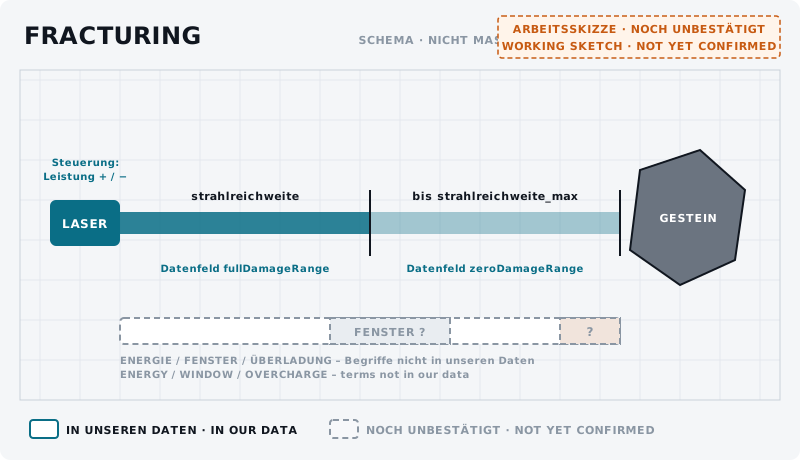
The laser values are sourced too: mining power and two range fields.q2 What they mean is explained in Mining heads explained.q3

Laser on the left, rock on the right, a beam in two sections between them; below a dashed energy bar with “window ?” and “?”.
DiagramFracturing – what is sourced UNCONFIRMEDLaser and rock with the two range fields of the mining lasers (fullDamageRange, zeroDamageRange) and the power control from the controls. Energy window and overcharge are dashed – these terms are not in our data.Own graphic · claude-entwurf, 2026-09-11
An optimal power window, an energy zone or an overcharge do not appear in our data. Whether and how the game shows them we check with the exercise below.

Next

After breaking: Extraction & cargo.

training.fracturing.01AdvancedUNCONFIRMED
Goal
Watch and record what happens while breaking.
Preparation
Mining ship, a small rock in the scan, notes ready.
Task
Aim the laser at the rock, increase power step by step and note after each step which displays change. Repeat with a second rock.
Success criterion
Still open – will be set after our own in-game test.
Partner
not required
Functions needed
  • Toggle Mining Operator Mode
  • Fire Mining Laser (Toggle)
  • Increase Mining Laser Power
  • Decrease Mining Laser Power

Checklist

  • Increase and decrease power sit next to each other.
  • While breaking you note which displays change.

On your Stream Deck

These functions belong to this topic. Which key that is for you is shown by the BalduursGATE plugin based on your own bindings – on purpose, no key is listed here.

Profile page MINING

  • Toggle Mining Operator Mode
  • Set Mining Operator Mode
  • Fire Mining Laser (Toggle)
  • Switch Mining Laser (Toggle)
  • Increase Mining Laser Power
  • Decrease Mining Laser Power
  • Toggle Laser Beam (High / low)
  • Activate Mining Module (Slot 1)
  • Activate Mining Module (Slot 2)
  • Activate Mining Module (Slot 3)

Read next

Links are stored in the hub entry – the index computes the reverse direction. No address is hard-coded here.

← Back to the Academy

Sources

  1. q1GAME DATAACTION-MASTER – Steuerungsfunktionen aus defaultProfile.xml und global.ini (SC-4.10-ACTION-MASTER.json)Build 4.10.0-hotfix (55227)Namen, Gruppen, Auslöseart und Standardbelegung (belegt ja/nein) gelesen – keine Tasten.
  2. q2GAME DATAChronist – Auszug aus der Data.p4k: Schiffsbauteile, Rohstoffe, Raffinerieverfahren, Baupläne, Orte (chronist/index.json)Build 4.10.0-hotfix (55227)Gelesen, nicht gedeutet. Namen teils aus der deutschen global.ini, teils englisch.
  3. q3GAME DATAChronist – Rechenweg der Bergbaulaser-Werte (sc-chronist.py, Funktion ausruestung)Build 4.10.0-hotfix (55227)Abbauleistung = Schadenswert je Sekunde im Strahl-Block, Reichweiten = fullDamageRange / zeroDamageRange, Strom = Strom-Segment.
  4. q4COMMUNITYMineCalc und RegolithCo-Common – Community-Tabellen zu Erzen, Vorkommen und Raffinerie (im Bestand als chronist/erz-tabellen.json)https://github.com/itssilly4u/MineCalc · retrieved 2026-08-04 · License: MITNicht aus den Spieldaten. Im Hub nicht angebunden – hier werden keine Werte daraus übernommen.

Patch and version information

Valid from
4.10.0
Valid until
open
Game data version
4.10.0-hotfix (55227)
Version
1 · EN Version 1
Review entries
none
Identifier
guide.mining-fracturing