OMC FLY SAFE. FLY TOGETHER.
BalduursGATE Field ManualFPS – Movement & stance4.10.0-hotfix (55227) · Version 1 · Sourced
FM · FPS · FPS-BEWEGUNG · guide.fps-bewegungOnline version: https://oldmensclub.de/citizen-hub/academy/fps-bewegung.en.html
BalduursGATE Field Manual · Academy · Edition 1
FPSLevel: Beginner

FPS – Movement & stance

All movement and stance functions from the controls – mechanics separated from tactics. How fast you are and what protects you stays open.

Valid from patch
4.10.0
Game data version
4.10.0-hotfix (55227)
Version
1
Updated
2026-09-11
Review statusSourced

Every control function and game object used exists in the current game version. The statements come from the sources listed.

Review path and sources

Editorial in-game review

Nobody from the editorial team has flown it in game yet. The information comes from the sources listed below.

What you will learn

  • Know the movement and stance functions.
  • Keep mechanics and tactics apart.

Prerequisites

What this is about

This is about mechanics: which movement and stance functions exist and how they are triggered.q1 Tactics – when to crouch, which side to lean out – appear only as open questions.

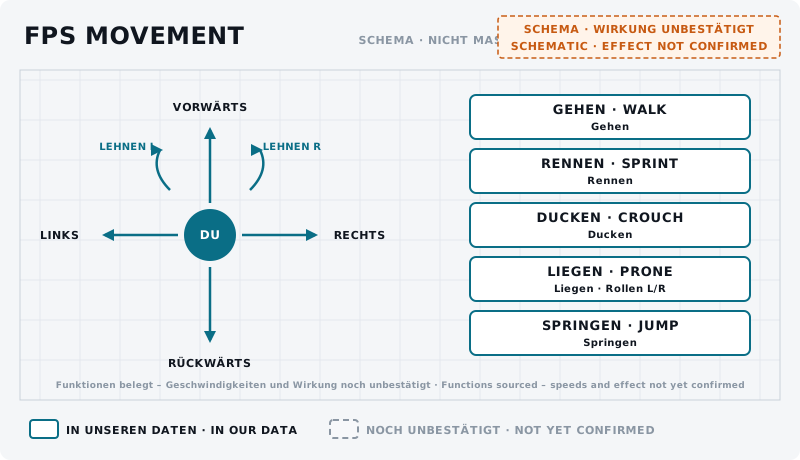
Schematic: a circle “you” with four arrows and two lean arrows; next to it five boxes with stances.
DiagramFPS movement – schematic UNCONFIRMEDLeft the four movement directions and lean, right the stances walk, sprint, crouch, prone (with roll) and jump – all functions from the controls. Speeds and effect are not sourced.Own graphic · claude-entwurf, 2026-09-11

Directions

Move Forward, Move Backwards, Move Left, Move Right – hold functions, plus gamepad axes.q1 Default Movement Speed Increase and Decrease change the base pace.q1

Stance

  • Walk – a short press, not bound in the default profile.q1
  • Sprint – a short tap toggles, holding works while you hold.q1
  • Crouch – toggle.q1
  • Prone – toggle; while prone Roll Left (while Prone) and Roll Right (while Prone).q1
  • Jump, plus Jump Thrusters - Activate (hold) and Climb Ledges.q1
  • Lean Left and Lean Right – hold functions.q1

Cover & movement

Whether crouching, prone or leaning protects against hits in game, how much cover an object gives and which side is better for leaning is not sourced in our data. We record that only after a test of our own.
training.fps-bewegung.01BeginnerUNCONFIRMED
Goal
Try movement, crouch and lean.
Preparation
On foot in a safe place with some cover nearby.
Task
Walk, sprint, crouch, go prone and roll left and right while prone. Lean left and right behind an object. Note what changes in view and pace.
Success criterion
You can take and leave every stance.
Partner
not required
Functions needed
  • Crouch
  • Prone
  • Walk
  • Roll Left (while Prone)
  • Roll Right (while Prone)

Checklist

  • Crouch and prone are toggles – you know how to get back up.
  • Lean left/right are hold functions on mouse or keyboard.

On your Stream Deck

These functions belong to this topic. Which key that is for you is shown by the BalduursGATE plugin based on your own bindings – on purpose, no key is listed here.

Profile page FPS MOVEMENT

  • Crouch
  • Prone
  • Walk
  • Default Movement Speed Increase
  • Default Movement Speed Decrease
  • Roll Left (while Prone)
  • Roll Right (while Prone)

The profile page FPS MOVEMENT is part of OMC Stream Deck 0.9.0. Go to the Download Center →

Read next

Links are stored in the hub entry – the index computes the reverse direction. No address is hard-coded here.

← Back to the Academy

Sources

  1. q1GAME DATAACTION-MASTER – Steuerungsfunktionen aus defaultProfile.xml und global.ini (SC-4.10-ACTION-MASTER.json)Build 4.10.0-hotfix (55227)Namen, Gruppen, Auslöseart und Standardbelegung (belegt ja/nein) gelesen – keine Tasten.

Patch and version information

Valid from
4.10.0
Valid until
open
Game data version
4.10.0-hotfix (55227)
Version
1 · EN Version 1
Review entries
none
Identifier
guide.fps-bewegung