OMC FLY SAFE. FLY TOGETHER.
BalduursGATE Field ManualSalvage – Basics4.10.0-hotfix (55227) · Version 1 · Sourced
FM · SALVAGE · SALVAGE-GRUNDLAGEN · guide.salvage-grundlagenOnline version: https://oldmensclub.de/citizen-hub/academy/salvage-grundlagen.en.html
BalduursGATE Field Manual · Academy · Edition 1
SalvageLevel: Beginner

Salvage – Basics

What our game data contains on salvage: ships with salvage head slots, scraper modules, control functions – and what is not yet confirmed.

Valid from patch
4.10.0
Game data version
4.10.0-hotfix (55227)
Version
1
Updated
2026-09-11
Review statusSourced

Every control function and game object used exists in the current game version. The statements come from the sources listed.

Review path and sources

Editorial in-game review

Nobody from the editorial team has flown it in game yet. The information comes from the sources listed below.

What you will learn

  • Know which ships carry salvage heads according to the game data.
  • Know the salvage control functions by group.
  • Tell sourced from unconfirmed.

Prerequisites

No special prerequisites listed.

What salvage covers in our data

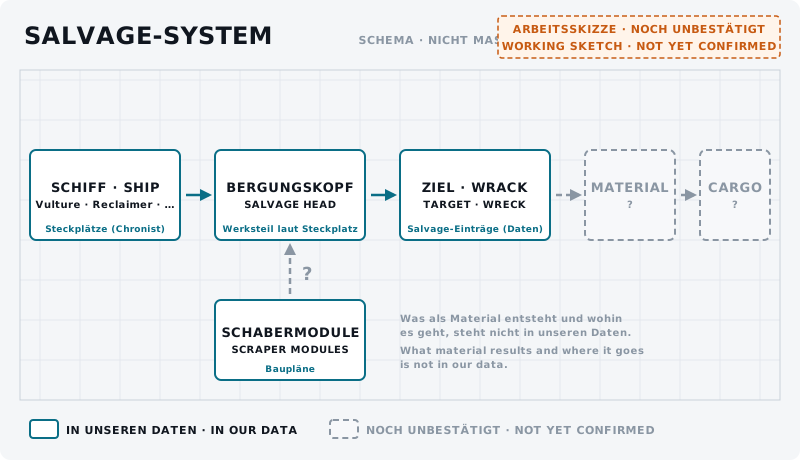
In salvage, ships with salvage heads recover material from wrecks. In our slot data five ships have a salvage head slot.q1 The controls have a dedicated salvage mode with tools for scraping and breaking up.q3 The blueprints list five scraper modules.q2

Boxes ship, salvage head, target/wreck solid; material and cargo dashed; below scraper modules with a question mark.
DiagramSalvage system – overview UNCONFIRMEDShip → salvage head → target/wreck is in our data (slots, salvage entries). Which material results and how it gets into the cargo is dashed – not yet confirmed. Scraper modules exist in the blueprints; where they sit is open.Own graphic · claude-entwurf, 2026-09-11

Ships

Ships with salvage head slots q1From the game data · 4.10.0-hotfix (55227)

“Stock” is the part the ship comes with according to the game data.

NameSlots: Bergungskopf
Drake Vulture2 × size 2 · stock: Baler-Bergungskopf
AEGS Reclaimer2 × size 2 · stock: Baler-Bergungskopf
MISC Fortune1 × size 2 · stock: Baler-Bergungskopf
Argo MOTH3 × size 2 · stock: Baler-Bergungskopf
RSI Salvation2 × size 2 · stock: Salvation Salvage Head

Vulture and Reclaimer have their own guides: Vulture – solo salvage guide and Reclaimer – crew salvage guide.

Components

In our data salvage heads only appear as stock parts in the slots, not as parts of their own with values.q1 Scraper modules and tractor beams are shown in Salvage components explained.

Controls

The main groups:q3

  • Toggle Salvage Operator Mode and Set Salvage Operator Mode.
  • Firing: Toggle Fire Focused, Left, Right, Fracture and Disintegrate – a short tap toggles, holding fires for as long as you hold.
  • Focus: Focus all salvage heads, Focus left/right salvage head, Focus Fracture tool, Focus Disintegration tool.

The full list is below under the Stream Deck functions.

Typical steps

The workflow with all ten steps is in Salvage – from wreck to cargo. You scan targets as described in Scanning – Basics.

What salvaging yields, what it is worth and which ship suits what is not in our data.
training.salvage-steuerung.01BeginnerUNCONFIRMED
Goal
Find the salvage functions on your own bindings.
Preparation
In a salvage ship, landed or in open space. The game’s control options or the BalduursGATE plugin’s binding view open.
Task
Go through this guide’s “Stream Deck functions” list and note for each function whether it is bound for you. Bind what is missing.
Success criterion
For every function on the list you know whether and where it is bound for you.
Partner
not required
Functions needed
  • Toggle Salvage Operator Mode
  • Toggle Fire Focused
  • Focus all salvage heads
  • Toggle Scanning Operator Mode

Checklist

  • “Toggle Salvage Operator Mode” is on a key or your Stream Deck.
  • What salvaging yields you check yourself – the guide does not say yet.

On your Stream Deck

These functions belong to this topic. Which key that is for you is shown by the BalduursGATE plugin based on your own bindings – on purpose, no key is listed here.

Profile page SCANNING

  • Toggle Scanning Operator Mode
  • Activate Ping (Hold & Release)

Profile page SALVAGE

  • Toggle Salvage Operator Mode
  • Set Salvage Operator Mode
  • Toggle Fire Focused
  • Toggle Fire Left
  • Toggle Fire Right
  • Toggle Fire Fracture
  • Toggle Fire Disintegrate
  • Focus all salvage heads
  • Focus left salvage head
  • Focus right salvage head
  • Focus Fracture tool
  • Focus Disintegration tool

Profile page BalduursGATE Live

  • MAYDAY – distress call

Read next

Links are stored in the hub entry – the index computes the reverse direction. No address is hard-coded here.

← Back to the Academy

Sources

  1. q1GAME DATAChronist – Steckplätze und Werksbestückung je Schiff (chronist/steckplaetze.json)Build 4.10.0-hotfix (55227)
  2. q2GAME DATAChronist – Auszug aus der Data.p4k: Schiffsbauteile, Rohstoffe, Raffinerieverfahren, Baupläne, Orte (chronist/index.json)Build 4.10.0-hotfix (55227)Gelesen, nicht gedeutet. Namen teils aus der deutschen global.ini, teils englisch.
  3. q3GAME DATAACTION-MASTER – Steuerungsfunktionen aus defaultProfile.xml und global.ini (SC-4.10-ACTION-MASTER.json)Build 4.10.0-hotfix (55227)Namen, Gruppen, Auslöseart und Standardbelegung (belegt ja/nein) gelesen – keine Tasten.

Patch and version information

Valid from
4.10.0
Valid until
open
Game data version
4.10.0-hotfix (55227)
Version
1 · EN Version 1
Review entries
none
Identifier
guide.salvage-grundlagen