OMC FLY SAFE. FLY TOGETHER.
BalduursGATE Field ManualSalvage – from wreck to cargo4.10.0-hotfix (55227) · Version 1 · Sourced
FM · SALVAGE · SALVAGE-ABLAUF · guide.salvage-ablaufOnline version: https://oldmensclub.de/citizen-hub/academy/salvage-ablauf.en.html
BalduursGATE Field Manual · Academy · Edition 1
SalvageLevel: Beginner

Salvage – from wreck to cargo

Ten steps from target to sale with the matching control functions. The functions are sourced – the sequence itself is still a working sketch.

Valid from patch
4.10.0
Game data version
4.10.0-hotfix (55227)
Version
1
Updated
2026-09-11
Review statusSourced

Every control function and game object used exists in the current game version. The statements come from the sources listed.

Review path and sources

Editorial in-game review

Nobody from the editorial team has flown it in game yet. The information comes from the sources listed below.

What you will learn

  • Know the steps from wreck to cargo.
  • Find the matching functions for each step.

Prerequisites

What this is about

Ten steps from wreck to cargo. The control functions are sourced – their names are as in the game data.q1 The order and everything that happens in game is a working sequence and not yet checked.

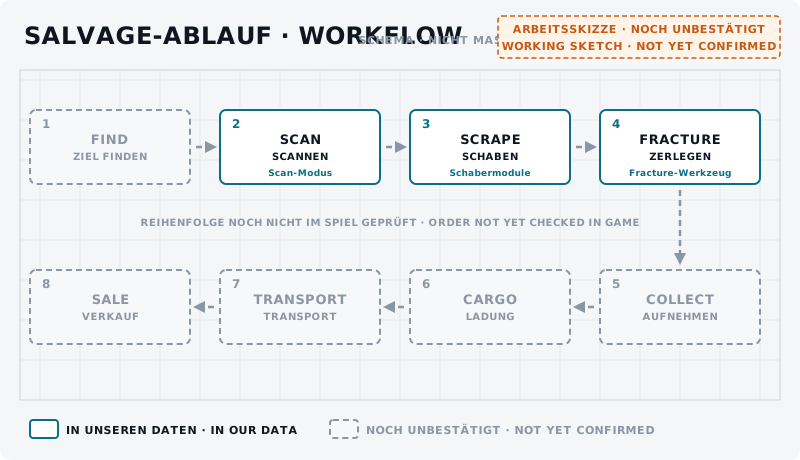
Flow chart with eight boxes in two rows; scan, scrape and fracture solid, the rest dashed.
DiagramSalvage workflow – overview UNCONFIRMEDEight stations: find, scan, scrape, fracture, collect, cargo, transport, sale. Solid: functions or parts exist in our data (scanning mode, scraper modules, fracture tool). Dashed: no data yet. The order has not been checked in game.Own graphic · claude-entwurf, 2026-09-11

1. Preparation

Salvage ships according to the slot data: Vulture, Reclaimer, Fortune, MOTH, Salvation.q2 Put this guide's functions on keys or your Stream Deck.

If something goes wrong: the MAYDAY key in the BalduursGATE client sends a distress call with your location to the crew.

2. Find a target

Where wrecks are found is not in our data. The game data lists salvage entries, but no locations.q3

3. Scanning

Toggle Scanning Operator Mode, Increase/Decrease scanning angle and Activate Ping – details in Scanning – Basics.q1

4. Positioning

For positioning in front of the wreck there are general flight functions such as Spacebrake and decoupled mode.q1

Distance and attitude to the wreck are not sourced.

5. Salvage mode

Toggle Salvage Operator Mode is bound in the default profile; Set Salvage Operator Mode switches it on directly.q1 Plus Salvage Mode Gimbal (Toggle) and Salvage Mode Gimbal Reset.q1

training.salvage-mode.01BeginnerUNCONFIRMED
Goal
Switch salvage mode on and check the controls.
Preparation
In a salvage ship in open space, no wreck in front of the ship.
Task
Switch salvage mode on. Change focus between all heads, left and right, toggle salvage gimbal mode, reset it and leave salvage mode again. Note what changes on the display.
Success criterion
You can trigger every function and leave salvage mode again.
Partner
not required
Functions needed
  • Toggle Salvage Operator Mode
  • Focus all salvage heads
  • Focus left salvage head
  • Focus right salvage head
  • Salvage Mode Gimbal (Toggle)
  • Salvage Mode Gimbal Reset

6. Hull scraping

Fire with Toggle Fire Focused, Left or Right; focus with Focus all salvage heads or per head; Increase/Decrease Beam Spacing; cycle modifiers.q1 More: Hull scraping explained.

7. Structural salvage / fracturing

Focus Fracture tool, Toggle Fire Fracture, Focus Disintegration tool, Toggle Fire Disintegrate and Cycle Structural Salvage Modes.q1 More: Structural salvage & fracturing.

When breaking up makes more sense than scraping is not sourced.

8. Pick up material

How the material gets on board we are still checking in game.

9. Organise cargo

Tractor Beam Vehicle - Increase/Decrease Distance and Request Cargo Loading are in the controls.q1 More: Cargo handling in salvage.

10. Transport / sale

Continue in Salvage – transport & sale. The ships in detail: Vulture, Reclaimer.

Checklist

  • Salvage mode, firing and focus are within reach.
  • Increase/decrease beam spacing is bound – it is not in the default profile.
  • MAYDAY in the BalduursGATE client is set up.

On your Stream Deck

These functions belong to this topic. Which key that is for you is shown by the BalduursGATE plugin based on your own bindings – on purpose, no key is listed here.

Profile page FLIGHT

  • Enable / Disable decoupled mode

Profile page FLIGHT MOVEMENT

  • Spacebrake

Profile page SCANNING

  • Toggle Scanning Operator Mode
  • Set Scanning Operator Mode
  • Increase Scanning Angle
  • Decrease Scanning Angle
  • MFD - Set Page - Scanning (Short Press)
  • MFD - Set Page - Scanning (Long Press)
  • Activate Ping (Hold & Release)

Profile page POWER

  • Toggle Power - All
  • Toggle Power - Thrusters
  • Toggle Power - Shields
  • Toggle Power - Weapons

Profile page SALVAGE

  • Toggle Salvage Operator Mode
  • Set Salvage Operator Mode
  • Toggle Fire Focused
  • Toggle Fire Left
  • Toggle Fire Right
  • Toggle Fire Fracture
  • Toggle Fire Disintegrate
  • Focus all salvage heads
  • Focus left salvage head
  • Focus right salvage head
  • Focus Fracture tool
  • Focus Disintegration tool
  • Salvage Mode Gimbal (Toggle)
  • Salvage Mode Gimbal Reset
  • Increase Beam Spacing
  • Decrease Beam Spacing
  • Cycle Focused Salvage Modifiers
  • Cycle Left Salvage Modifiers
  • Cycle Right Salvage Modifiers
  • Cycle Structural Salvage Modes

Profile page TRACTOR

  • Tractor Beam Vehicle- Increase Distance
  • Tractor Beam Vehicle - Decrease Distance

Profile page CARGO

  • Request Cargo Loading

Profile page BalduursGATE Live

  • MAYDAY – distress call

The profile page CARGO, TRACTOR is part of OMC Stream Deck 0.9.0. Go to the Download Center →

Read next

Links are stored in the hub entry – the index computes the reverse direction. No address is hard-coded here.

← Back to the Academy

Sources

  1. q1GAME DATAACTION-MASTER – Steuerungsfunktionen aus defaultProfile.xml und global.ini (SC-4.10-ACTION-MASTER.json)Build 4.10.0-hotfix (55227)Namen, Gruppen, Auslöseart und Standardbelegung (belegt ja/nein) gelesen – keine Tasten.
  2. q2GAME DATAChronist – Steckplätze und Werksbestückung je Schiff (chronist/steckplaetze.json)Build 4.10.0-hotfix (55227)
  3. q3GAME DATAChronist – Auszug aus der Data.p4k: Schiffsbauteile, Rohstoffe, Raffinerieverfahren, Baupläne, Orte (chronist/index.json)Build 4.10.0-hotfix (55227)Gelesen, nicht gedeutet. Namen teils aus der deutschen global.ini, teils englisch.

Patch and version information

Valid from
4.10.0
Valid until
open
Game data version
4.10.0-hotfix (55227)
Version
1 · EN Version 1
Review entries
none
Identifier
guide.salvage-ablauf