OMC FLY SAFE. FLY TOGETHER.
BalduursGATE Field ManualNavigation & map4.10.0-hotfix (55227) · Version 1 · Sourced
FM · NEW CITIZEN · NEWCITIZEN-NAVIGATION · guide.newcitizen-navigationOnline version: https://oldmensclub.de/citizen-hub/academy/newcitizen-navigation.en.html
BalduursGATE Field Manual · Academy · Edition 1
New CitizenLevel: Beginner

Navigation & map

Pick a destination on the map, find the marker on your visor, line the ship up: this is how you get where you want to go.

Valid from patch
4.10.0
Game data version
4.10.0-hotfix (55227)
Version
1
Updated
2026-09-11
Review statusSourced

Every control function and game object used exists in the current game version. The statements come from the sources listed.

Review path and sources

Editorial in-game review

Nobody from the editorial team has flown it in game yet. The information comes from the sources listed below.

What you will learn

  • Set a destination and find it again.
  • Know the difference between the flight modes.

Prerequisites

What this is about

There are no roads in the verse. You look for your destination on the map, the game sets a marker, and you line your ship up with it.

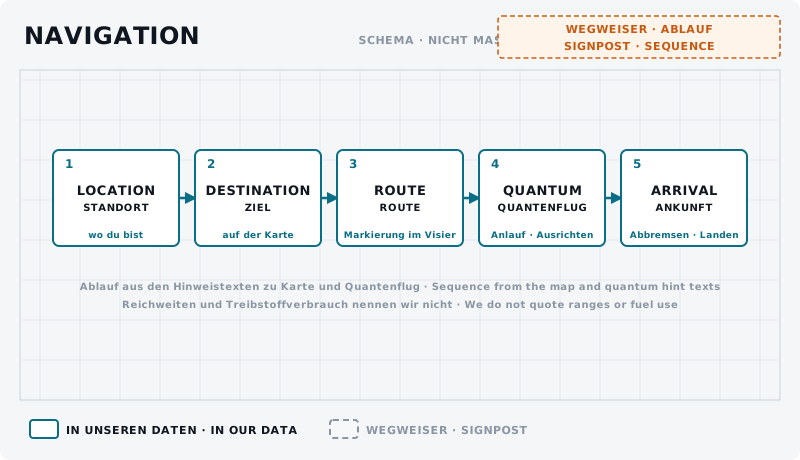
Five numbered boxes in a row, connected by arrows.
DiagramNavigation UNCONFIRMEDFrom your own position through destination, route and quantum travel to arrival.Own graphic · claude-entwurf, 2026-09-11

The map

There is a dedicated function for the map in the controls – on foot and in the ship.q2 There you find your destination and set it.

Once set, the game text says a waypoint appears on your visor.q1

Marker and route

The marker is your route: you turn the ship so that it sits in front of you. You need that right away for quantum travel – no alignment, no jump.q1

If you see no marker: open the map and check whether the destination is really set. It happens to everyone at the start.

Flight modes

The ship has two operating modes you switch between: one for close range and combat and one for travel and quantum travel. In the controls they are called SCM and NAV, and there are functions for cycling and for setting them directly.q2

For the start it is enough: NAV for long distances, SCM for everything else.

What exactly the modes change about speed and weapons is not part of this beginner guide – and we quote no numbers for it here.

Next: quantum travel

Checklist

  • You have opened the map and set a destination.
  • You can see the marker on your visor.
  • You can switch between the flight modes.

On your Stream Deck

These functions belong to this topic. Which key that is for you is shown by the BalduursGATE plugin based on your own bindings – on purpose, no key is listed here.

Profile page NAVIGATION / QUANTUM

  • Cycle Master Mode (Short Press)
  • Set Master Mode to Nav
  • Set Master Mode to SCM

Profile page MOBIGLAS

  • Map

The profile page FLIGHT, NAVIGATION / QUANTUM, MOBIGLAS is part of OMC Stream Deck 0.9.0. Go to the Download Center →

Read next

Links are stored in the hub entry – the index computes the reverse direction. No address is hard-coded here.

← Back to the Academy

Sources

  1. q1GAME DATASpieltexte – Hinweise des Spiels zu Aufstehen, Fahrzeugterminal, Flugverkehrskontrolle, Quantenflug, Inventar und Diensten (global.ini english / german_(germany))Build 4.10.0-hotfix (55227)Sinngemäß zusammengefasst, nicht zitiert. Wo der deutsche Text fehlt, gilt der englische.
  2. q2GAME DATAACTION-MASTER – Steuerungsfunktionen aus defaultProfile.xml und global.ini (SC-4.10-ACTION-MASTER.json)Build 4.10.0-hotfix (55227)Namen, Gruppen, Auslöseart und Standardbelegung (belegt ja/nein) gelesen – keine Tasten.

Patch and version information

Valid from
4.10.0
Valid until
open
Game data version
4.10.0-hotfix (55227)
Version
1 · EN Version 1
Review entries
none
Identifier
guide.newcitizen-navigation