Worum es geht
Du hast Star Citizen gestartet und wachst irgendwo auf. Kein Tutorial, kein Pfeil, der sagt „hier lang“. Dieser Guide sagt dir, was du in den ersten Minuten tust – in der Reihenfolge, in der es Sinn ergibt.
Wach werden
Du beginnst meist in einem Bett in deiner Unterkunft. Der erste Schritt ist wörtlich gemeint: aufstehen. Das Spiel hat dafür eine eigene Funktion („Sitz verlassen“).q1
Bleib kurz stehen und schau dich um. Nichts drängt.
Orientieren
Drei Dinge helfen sofort:
- Der Ausgang. Unterkünfte sind klein; es gibt genau eine Tür.
- Der Aufzug. Er bringt dich zu Läden, zum Raumhafen und zu den Fahrzeugterminals.
- Die Markierungen in deinem Blickfeld. Das Spiel blendet Schilder und Wegpunkte ein.
Wenn dich etwas nicht reagiert: Du brauchst fast immer den Interaktionsmodus – eine Taste, die einen Mauszeiger einblendet, mit dem du Knöpfe und Türen bedienst.q2 Mehr dazu in Steuerung & Interaktion.
Wort für Wort
Diese Begriffe fallen ständig. Einmal erklärt, dann bist du dabei:
- mobiGlas – dein Computer am Handgelenk. Karte, Aufträge, Inventar, Nachrichten. Eigener Guide: mobiGlas verstehen.
- PU – „Persistent Universe“, das gemeinsame Spieluniversum, in dem alle zusammen unterwegs sind.
- Shard – der Server, auf dem du gerade spielst. Andere Spieler auf einem anderen Shard siehst du nicht.
- Fahrzeugterminal (ASOP) – der Automat, an dem du deine Schiffe anforderst. Im Spiel heißt die Oberfläche „Flottenmanager“.q1
- ATC – die Flugverkehrskontrolle. Sie gibt dir einen Hangar oder einen Landeplatz frei.q1
- Quantenflug (Quantum) – der Sprung über große Strecken. Ohne ihn bist du Stunden unterwegs.
- FPS – „First Person Shooter“: alles, was du zu Fuß machst, vor allem Kampf.
- SCU – die Größenangabe für Frachtkisten. Brauchst du erst, wenn du Fracht fliegst.
- HUD – die Anzeigen, die dir im Cockpit oder im Helm eingeblendet werden.
Die ersten Schritte
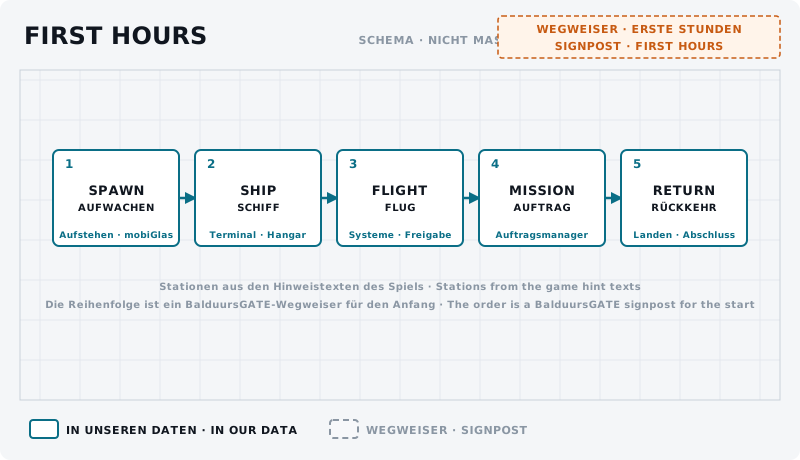
- Aufstehen und aus der Unterkunft gehen.
- mobiGlas einmal öffnen und wieder schließen.
- Zum Fahrzeugterminal gehen und dein Schiff anfordern: Dein Schiff finden.
- Einsteigen und die Systeme einschalten: Dein Schiff starten.
- Freigabe holen und starten: Starten & landen.
- Einen einfachen Auftrag annehmen: Deine erste Mission.
Wenn etwas nicht klappt – und am Anfang klappt einiges nicht –, steht in Wenn etwas schiefgeht, was dann hilft.
Weiter: Steuerung & Interaktion